

Enjoy the webinar!
Recorded on March 12, 2026.
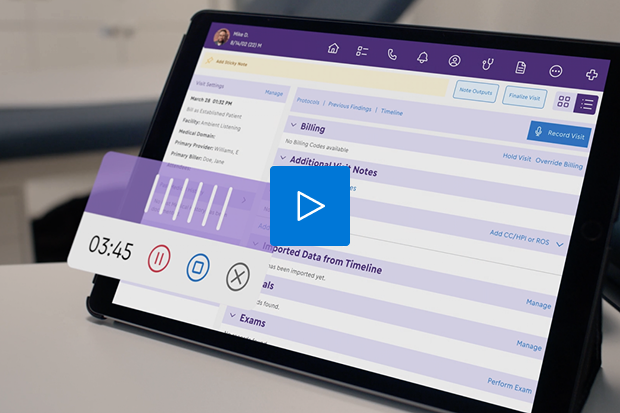
Hello everyone and thank you for joining us for today's webinar. Before we get started, there are a couple of housekeeping items that I would like to mention to all of you. The first is that we will be doing a live Q session at the end of today's webinar. So at any time during today's webinar, if you have any questions, feel free to submit them under the Q and A tab on the, I believe on the right side of your screen. And our speakers for today will address your questions during the live Q and A session at the end. We also have some polling questions that we would love to have your participation in. And also before we get started, there is a legal disclaimer that I need to read to all of you, which is that the materials and other information included in the following presentation are provided as of the date of this session on March twelfth, twenty twenty six, unless specifically noted and may be subject to change. Has no obligation to provide updates to the information provided. ModMed and the presenters make no warranty regarding the accuracy or completeness of the information provided. This presentation includes forward looking statements, including information about solutions and features that are not yet available. The decision and timing regarding release and development of solutions and features may be subject to change. Actual solutions and features may differ materially from any of those expressed in this presentation or other forward looking statements. Any purchasing decisions made by you should be solely based on ModMed's existing solutions and functionality. This presentation is intended for informational purposes only and does constitute financial, legal, medical, or consulting advice. Please consult with your legal counsel or other qualified advisor to ensure compliance with applicable laws, regulations, and standards. So the topic of today's webinar is reimagining orthopedic and pain documentation with AI. I will now be joined on stage by our speakers for today's webinar. Thank you for joining. I will go ahead and turn the webinar over to the speakers. Good evening, everybody. Thank you for joining us this evening. I'm Kris Lavoura, the National Sales Manager over the Orthopedics and Pain Management Department here at ModMed. Good evening, everyone. This is Adele Schwelt. I'm the principal solutions consultant here at ModMed. I focus on our musculoskeletal specialties. So those include orthopedics, pain management, and also podiatry. Shortly here in the webinar, you will see Chris and I go through a demonstration of our AI Scribe. I will be playing the provider and Chris will be playing the patient. Awesome. So as Yvette mentioned, the title of this webinar is Reimagining Orthopedic and Pain Documentation with AI. So really, why are we here? Really, because for the first time, medical group leaders have ranked AI as the top priority, even above EHR usability. The industry is now shifting from if we should use AI to how to implement it effectively in our practices. As we look at the different AI solutions that are out there, most of them are third party or EHR agnostic. This is a hidden trap in a fragmented platform. They're often just dictation tools that leave you with a massive block of text. You still have to copy, paste, maybe even edit that text. There's no automation. It's more of a detour than it is a solution. So some of the things that you kind of see as we talk about the fragmented AI and then how it's a bit of a trap is the manual transfer trap. As I just mentioned, disconnected AI creates free text summaries, but then you're left with the manual work of moving that into your EHR to create your documentation. It's a dead end. It stops at the note, leaving critical tasks like orders, billing, prescriptions up to you or your staff to still finish. Most of these tools use generalist vocabulary. So these systems struggle with the specific terminology and logic for orthopedics and pain management. If the AI lacks your clinical dialect, you'll spend your night editing those mistakes. There's also system level risks. You're adding another third party solution. You're adding extra custom bridges, and you're having a disconnected infrastructure. This can cause you to run into security and latency issues while sending sensitive data to generic cloud services. The takeaway is really simple. Ascribe is only as smart as the system that it lives in. Without the brain of the integrated EHR, the voice of the generic AI is just more noise and, in fact, creates more manual work. AI is the buzzword of the year, but most solutions are third party, meaning they don't know your specialty, they don't talk to your billing, they are just dictation tools and leave you with a bunch of text you still have to transfer and edit. Before we show you how we solve it and how ModMed has looked at this, entire solution differently, let's pause and kinda ground ourselves a little bit in the facts of of clinical documentation today. This is kind of our reality check. Clinicians are spending far too much time on administrative tasks, often working after hours just to get it all done. The reality is stark. For every hour of patient care, clinicians are spending up to two hours charting. These documentation delays often lead to increased errors, your evenings are spent finishing notes instead of with your family, and that demanding juggling act of catching up begins around noon every single day. This is not sustainable. This is the problem that the clinical piece of the AI powered practice is specifically designed to eliminate. What you'll see on the screen now is our comprehensive vision for the future and what we're actively working on today. It is not about bolting on single features. It is about seamlessly weaving AI into every corner of your practice. From patient engagement to clinical to financial, the core principles of bringing AI to your entire practice is in an easy to use manner that keeps you fully in control. While this vision covers the entire practice, today we're going to focus our deep dive on the clinical piece. This is where we can generate immediate impact, increasing efficiency, and saving you and your team's time. Before we jump into, exactly how we do that with our with our Scribe platform, we'd like to ask you guys a quick question. You should see a a poll document pop up, on your screen. If you could please just answer the questionnaire for us. How many hours a day do you spend on documentation after your last patient leaves for the day? So I'm seeing the the most upvotes going to to one to two hours. You know, that's not an insignificant time. Looks like working through the weekend is catching up. That actually reminds me of a conversation I had recently where someone told me they spent six hours catching up on a Sunday. Really appreciate that feedback. Neither of those are insignificant time amount of time, especially for busy clinicians. So I really think what we're gonna show you next and kind of walk through with how our Scribe works can resonate well here. So many of you have seen Emma before, our EHR. But today we're gonna show you Scribe, which is built directly into Emma. Because it's natively integrated, it doesn't suffer from any of that fragmented AI that I spoke about earlier, like the manual transfer trap or the disconnected infrastructure. Let me walk you through kind of exactly how it works in this three part step. So first, it listens. It doesn't just record. It captures the clinical conversation in real time. It even understands who the patient is, who the provider is, and if there's a third person in the room. Next, it translates. Because it lives inside Emma, it understands your clinical dialect. It identifies appropriate codes for exactly what you're saying, maps that conversation directly to the structured data inside of Emma, and it even updates the assessment and plan and checks for potential interactions as you speak. Finally, and this is where the real magic happens, Scribe acts on your behalf, generating orders, labs, prescriptions, suggested billing codes, and even completing your SOAP note follow ups, and patient education handouts. So really, your entire note is ready for you to review and your signature. Finalize it just like that. Without this level of full integration, these automated actions simply just are not possible. You'd be stuck with a block of text, a lot of manual work. With Emma and Scribe two point o, the system does that heavy lifting for you. One more quick poll question before we jump to Adele and the demonstration. If your documentation could automatically suggest your billing codes and draft your orders in real time, how would that change your daily volume? Seeing a pretty even mix of I could leave the office by five and I could add a couple more patients to the day. In my twelve plus years, that was pretty much the answers I was expecting there. So now we're gonna jump over to Adele and jump into the demonstration of Scribe two point o. In the top right corner, I will go ahead and choose record visit, confirm that if required everyone in the room has agreed to using AI to generate today's note, and then we can go ahead and start recording. Hi, John. How are you doing today? Hey doc, I've been better. I'm having some pain in my left shoulder that's been going on for a few months. It's getting worse, especially when I try to do anything overhead. I'm sorry to hear that. Can you tell me a little bit more about how it started? Was there any specific trauma or injury to your shoulder? Sure. I don't really remember any specific injury happening. I work out and do a lot of overhead lifting. So at first I thought it was just sore, but it's been pretty painful lately. I've had to stop doing a lot of the exercises because of it. It also tends to wake me up in the middle of the night if I roll to that side. Okay. Do you experience any weakness, numbness, or tingling down the arm at all? No numbness or tingling. Just feels really tight and painful whenever I reach overhead or behind my back. Have you tried any treatment so far to help with the pain at all? I've been resting it. I've tried ice a few times and Advil, which seems to help a little bit, but the pain comes back as soon as I'm active again. All right, well I'm going to go ahead and do an exam of your left shoulder. If you could just follow the motions that I'm doing here. Your forward flexion is about one hundred and sixty degrees with pain at the top, abduction to one hundred and twenty degrees with discomfort, and external rotation to about forty five degrees. I'm just going to do some further movements here if you could follow my arms. Okay, so it looks like you have pain with near and Hawkins impingement testing. The strength testing of rotator cuff shows five out of five strength, but with pain with supraspinatus testing. I don't see any instability in the shoulder joint. That definitely reproduced the pain I've been feeling. Okay, that's helpful for me to know, so thank you for telling me. All right, and I do see here that we ordered and took some x rays of your left shoulder today, so let's go ahead and review those together. I can see here the glenohumeral joint is well aligned with no fracture or dislocation. There is mild narrowing at the acromioclavicular joint with a small inferior acromial spur. There's no acute bony abnormalities that are seen either. So nothing's broken? Correct. It doesn't look like there's any fracture to be concerned about. The bony anatomy does show changes that can contribute to impingement. So really based on your history, your exam, and your imaging here, it looks like you have left shoulder impingement syndrome. The good news is that this is very commonly treated without surgery. That's great to hear. So what are my options? So treatment is really focused on reducing inflammation and improving shoulder mechanics. So with that, I'm going to prescribe naproxen five hundred milligrams to be taken twice daily with food for the next ten to fourteen days and then as needed for pain. And this should help calm the inflammation. Okay, I can try that. Great and given how much pain you're experiencing, especially at night, we can also do a subacromial steroid injection today which will help reduce inflammation more quickly. These items are separate and identifiable. Is that safe? Yes, it's a commonly performed procedure and I will use the ultrasound to guide the injection to ensure both accuracy and safety. That sounds good. Let's do it. Great. I will have my medical assistant set up for that. But in the meantime, I'm also going to refer you and prescribe physical therapy. So I'd like for you to go two to three times per week for about six weeks. And you'll really focus on rotator cuff strengthening and scapular stabilization. So for now just avoid heavy overhead lifting, but gentle range of motion exercises are encouraged. And I can give you a handout to show you some of those. Perfect. So when should I start feeling better? Well, do want you to follow-up with us in about six weeks and we'll reassess your progress at that point. But you should start feeling some relief quickly after the injection today. Sounds good. Thanks, doc. Now during this encounter, I spoke as if I were obtaining the entire history, performing the exam, and completing the assessment and plan within a single recording. However, in practice, rad techs or supporting clinical staff will also have access to ModMed Scribe and can capture the history on their iPads. In the top right corner of the chart, we can view the AI output and access the reconciliation page where we review ModMedScribe's automated suggestions before the note becomes final. Starting with the chief complaint and HPI, ModMedScribe generates a descriptive paragraph that filters out non medically relevant information. The exam section places findings in the appropriate areas of the exam, followed by the impression and plan and the associated ICD-ten codes. ModMed Scribe also generates a patient specific summary that combines the history, exam, assessment, and plan into one paragraph, allowing for easy reference for future encounters. Our image interpretation discussed during the visit is generated in an easy to read bulleted format. Next is the order for physical therapy and the prescription is queued up, ready to be sent after review. This is where the power of ModMedScribe working alongside Emma comes into play. Unlike other scribe solutions that don't know your personal documentation preferences, ModMedScribe works right from the start with the power of your existing Emma configurations, including procedure preferences, prescription signatures, counseling language, and ModMedScribe applies those to the suggested note content based on the patient provider conversation. Finally, the note includes follow-up instructions documented as six weeks consistent with what you had told the patient. Once we select reconcile that brings us to the visit overview screen where we can see all of the codes that have been suggested based on our clinical documentation. From this screen we can review the note directly, access the note outputs, and view the visit note, the generated encounter form, any orders, in this case physical therapy, and the patient handout. Once we're ready to move on, we can finalize the visit and continue on with our day. So I really wanna reiterate. The scribe is not just taking that transcription and writing a nice SOAP note. It's writing a nice SOAP note, but continuing to do all of those downstream effects because it's built on that platform of structured data that is already in Emma. But beyond clinic, we're expanding these AI assistants to front office and billing to reduce the entire operational burden of your practice. And we do wanna show you guys a quick little video of what we envision that to look like. Meet your new ModMed assistant. Actually, assistants. Hi there. At ModMed, we're forming the AI powered practice around you and your staff, and it's so much more than just responding to your prompts or listening to a patient visit. We're talking about creating an entire AI powered practice that includes assistance designed to do one thing, keep you from those days and nights of staring at a screen in frustration, thinking there must be a better way? Well, there is. We're building expert AI assistants that specialize in the workflows that slow your team down. They understand complex requests and automatically execute multi step tasks like patient scheduling and communication, eligibility processing, prior authorization, and claim denial appeals. Some AI assistants, like ModMed Scribe, can translate natural conversation into clinical action so that you can focus on the patient and not the documentation. Other AI assistants understand payer policies, handle high volumes of work at once, and promptly return a summarized, actionable result that you can trust. After you approve the assistant's recommendation, your AI assistant takes care of the rest, coordinating those tasks, highlighting what needs attention, and surfacing recommendations for your final approval. Every action is grounded and cited. And most importantly, you are always in control. With ModMed, it's responsible AI. Meet your new AI assistants. Always working, always ready for your request. Awesome. And then one more quick poll question before we open it up for any live q and a. After seeing what you've seen today and and discussing a little bit about ModMed, which of the following sounds more like you? Awesome. I'd really like to thank everybody for for participating in that last poll, and would love to open it up for a little bit of q and a. So, Del, I've got the first question coming in here. Can Scribe be used on a cell phone? Great question. So current state, Scribe is available on the iPad only. However, we are releasing the ability to use a mobile device for the capturing of the transcription with the ability to actually reconcile the note on a desktop or laptop computer. So that functionality is coming, but currently on the iPad. Perfect. Another follow-up here, can multiple people use Scribe in clinic? Yes. So multiple people can activate Scribe in clinic. So let's say that you have a medical assistant that works with you, and they typically capture an HPI for you, they can actually go into the room, start scribe on their end, have the conversation with the patient collect that HPI, and then you as the physician are able to come in afterwards and continue utilizing scribe for the remainder of the encounter. And then one final one that's just popping in here. Does that recording become part of the patient's chart? Great question. So the recording does not get saved into the chart, the transcription itself does not get saved into the chart. Once you finalize your note, or after seven days, whichever comes first, that transcription goes away from the medical record. Thank you. I'll kind of leave the Q and A up for a little bit, a few more minutes or a minute or two, in case anybody else wants to throw in any last minute questions. Here's one more. Do I need a dedicated iPad to use scribe or can I use on my iPad? So you don't necessarily need a dedicated iPad. But for Scribe to work optimally, we do recommend an iPad with an M chip. So it could be an M2, M3, but we do advise M4, which is going to be your iPad Pro for that. And looks like there's a question here in the q and a. Sorry if I missed this, but does Ascribe recommend an office level for billing? Yes. So it will suggest your office level code, whether it's, you know, level three, level four, and you'll see all of the justification for the automated billing based on what's actually captured by Scribe and based on that documentation. So you'll have all of the justification that supports the office level code that is generated. I'll leave it open here for a few more minutes just to see if any other questions pop in. Here's one more. Is this available today? I I guess I'll answer that one, actually. Yes. It actually went GA, on Monday, so GA means general availability. So it went live this past Monday, after, three rounds of beta testing. So it is live today. Alright. It looks like the questions seem to be slowing down. So, again, wanna thank everybody for for their, participation in the polls this evening, the questions, and giving us the time to show you not only what ModMed offers, but really dive into to our AI scribe, ModMed scribe two point zero. Thanks, everyone.
Tools for Empowering and Connecting With Patients
ModMed Pay

Patient Self-Scheduling

Patient Reminders

APPatient
Patient Portal

Learn how ModMed® helps empower practices and patients
Select a topic from our recorded webinars.