

Enjoy the webinar!
Recorded on March 19, 2026.
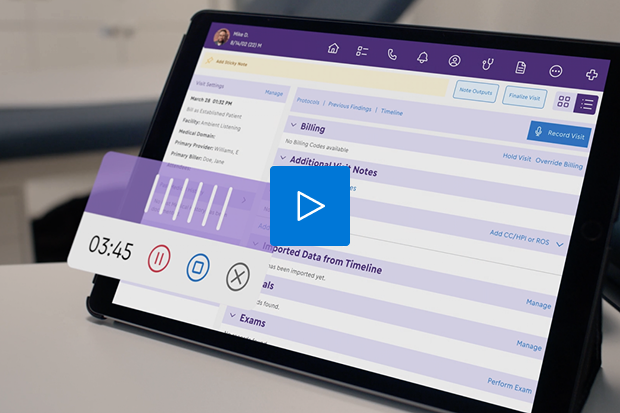
Hello everyone, and thank you for joining us for today's webinar. Before we get started, there are a couple of housekeeping items that I would like to share with all of you. The first is that we will have a live Q and A session at the end of today's webinar. So at any time, you can feel free to submit any questions you have under the Q and A tab that should be on the right hand side of your screen, and our speakers will address your question during the live Q and A at the end of the webinar. Also, have some polling questions that we would love to have your participation in. Before we get started as well, there is a legal disclaimer that I need to read to all of you, which is that the materials and other information included in the following presentation are provided as of the date of this session on March nineteenth, twenty twenty six, unless specifically noted and may be subject to change. ModMed has no obligation to provide updates to the information provided. ModMed and the presenters make no warranty regarding the accuracy or completeness of the information provided. This presentation includes forward looking statements, including information about solutions and features that are not yet available. The decision and timing regarding release and development of solutions and features may be subject to change. Actual solutions and features may differ materially from any of those expressed in this presentation or other forward looking statements. Any purchasing decisions made by you should be solely based on MonMed's existing solutions and functionality. This presentation is intended for informational purposes only and does not constitute financial, legal, medical, or consulting advice. Please consult with your legal counsel or other qualified advisor to ensure compliance with applicable laws, regulations, and standards. So the topic of today's webinar is reimagining podiatry documentation with AI. I will now be joined on stage by our speakers for today's webinar. Thank you speakers for joining, and I will now hand the webinar over to our speakers. Hi, everyone. Thank you for joining us today. My name is Kuei Tran, and I'm the General Manager of Podiatry here at MonMed. In my role as General Manager, my primary focus is ensuring that our technology specifically meets the unique clinical and operational needs of podiatrists. So I work really closely with our product development teams to make sure that we're just not building a general health care tool, but a solution that's actually understanding the workflow of a podiatry practice. And I also work closely with our customer success team, so I spend a lot of my time getting to know our podiatrists who are ultimately the stakeholders and user of our software. Joining me today is Doctor. Catherine Churchill, who is our Medical Director of Podiatry. Hi, everyone. I'm Katherine Churchill. I'm in private practice in New Jersey. I also serve as the Assistant Residency Director at Jersey Shore University Medical Center. I've been with MonMed for about two years now. And I am deeply involved in helping to build the AI technology that we'll demonstrate this evening. Awesome. Thank you, Doctor. Xochou. So to kick things off, let's look at why we're all here today. So in a recent NGMA poll, medical groups ranked AI as their number one technology priority for the first time in history. What's most telling about this that even it surpassed EHR usability, and that tells us that practices are no longer just looking for a place to store data. They are actually looking for intelligent partners to help manage the overwhelming administrative burden. Furthermore, our industry is now shifting from asking if they should use AI to how do we implement it more effectively. Now not all AI is created equal, so I'm sure you all have probably seen a lot of third party or EHR agnostic tools lately. And they sound really good on paper, but in practice, they often lead to what I call the manual transfer trap. If we look at the common pitfalls of these disconnected systems, there are four critical flaws that you need to be aware of. First is the documentation dead end. These tools typically stop at the note. So they might listen to your conversation, but then they leave you with the actual heavy lifting at the end, such as placing your orders, managing your prescriptions, and managing your billing. That's entirely up to you. So it's a half finished job. Second is the generalist vocabulary. Most AI models are built for general use, not for podiatry. They struggle viewer specific terminology and clinical logic. If your AI is not speaking your clinical dialect, you're going to spend your entire night editing its mistakes. Third is the manual transfer trap, and this is a really big one because these systems are disconnected. They're basically just producing a free text block. You then have to copy, paste, and reformat that text back into your EHR, and that's not true automation. It's just a really high-tech detour. And finally is system level risk. Sending sensitive patient data to a generic third party cloud service is unnecessarily introducing security risk to you and latency issues. So you're basically managing extra custom bridges, extra custom integrations just to make two systems talk to each other. The takeaway from that is simple. Your scribe is only gonna be as smart as the system it lives in. So if the AI is not built into your clinical engine, it's just one more app that you're going to have to manage. Without the brain of an integrated EHR, it's actually creating more manual work for you and your staff. And if the AI tool does not know your specialty and it's not talking to your billing, it's just gonna be another dictation tool that leaves you with, again, a block of text for you to copy, paste, and then edit. This is the reality check. So if you look at the numbers behind the administrative burden, recent data shows that seventy three percent of physician office hours are actually spent on tasks other than direct patient care. Clinicians are spending twenty eight hours a week on administrative tasks. So for every hour of patient care, you're spending two more hours on charting. These documentations delays leads to increased errors. Your evenings are spent finishing up notes instead of with your family. I mean, even your evening tonight, you're spending trying to figure out how to get your time back and maximize your clinical efficiency, which we're very grateful for that you're here. But not to mention, this is also going to impact how you're ultimately going to get paid as providers. This is a very non sustainable system that we're all operating in today, and this is the problem that we at ModMed are really passionate to specifically eliminate. We want to give you your time back and keep you fully in control of your business and prioritizing patient care. What you're looking at here is our comprehensive vision for the future, and this is called the AI powered practice, And more importantly, what we're actively building and delivering today. At MonMed, we're not believing in just bolting on a single AI feature and calling it a day. Our goal here is to seamlessly weave AI into every single corner of your practice, from your patient engagement to your clinical workflows, all the way through your financial operations. The core principle here is pretty simple. We want to bring your AI into your practice in a way that's not only easy to use, but keep you fully in control. AI should be your assistant, not your replacement. So our vision covers the entire ecosystem of your business. And today, we're just gonna focus doing a deep dive specifically on the clinical piece, which is really the heartbeat of your practice and this is where we can generate the most value and the most impact to you today by drastically increasing your efficiency and giving your team their time back. I'm going to pause here and pass this over to my colleague, Doctor. Churchill for this next section because it'd be good for you to hear directly from a clinician who's going through the same pain points that you are. Great. Thank you so much. So we're going to open up the first poll question. So a poll area should populate on the right hand side of your screen. There should be a red dot that you should be able to click on and answer our poll question. So we would love to hear from you. How many hours are you spending on documentation after your last patient leaves? I know for me, I have two little kids. So after I put them to bed at night, those hours that I have between when they go to bed and when I go to bed are my precious alone time. The last thing I wanna be doing during that time is is doing charts. So, you know, I've been using scribe in my office, and this has really helped cut down on that documentation time where I'm getting to finish my notes at work rather than bringing it home with me. So that's been very helpful for me. But very curious to see what your poll answers are for this. Okay. So it looks like people are saying that they're working through the weekend. So that's that's something that we definitely want to address and hopefully alleviate that burden and help prevent that burnout for our doctors. Okay. Okay, so many of you may have seen MR EHR platform. But today we're going to be showing you ModMed Scribe. So Scribe is built directly into our EHR system. It is natively integrated. So it doesn't suffer from any fragmented AI limitations that we just discussed, like the manual transfer trap or disconnected infrastructure. We'll walk you through exactly how it works. So first it listens. It doesn't just record. It captures the clinical conversation in real time. It understands who the patient is and who the provider is. And it even understands if there's another person in the room, you know, the patient has brought a family member with them, that there's a third party that we're obtaining the history from. It understands if there's music playing in the background. It understands if your medical assistant comes in and interrupts you during the visit and ask you about a different patient. It understands context. Not only does it listen, but it also translates. Because it lives inside of Emma, our EHR platform, it understands your clinical dialect. So it understands that when you say something like tinea pedis that that's the same thing as athlete's foot. So you can talk to a patient in just natural language. You don't have to use the formal ICD ten code, for it to be able to translate when you say athlete's foot into the ICD ten code for tenuquetas. It identifies appropriate codes for exactly what you're saying and it maps the conversation directly to structured data. It even updates the assessment and plan and checks for potential interactions as you speak. It also acts. So this is where the magic happens and where standalone AI apps fail. So Scribe acts on behalf of the provider by generating orders, labs and prescriptions. It attaches the necessary patient education documents and it preps the entire note so that it's ready for the doctor's signature. With this level of integration in your EHR, these automated actions simply aren't possible. You'd be stuck with a block of text and a lot of manual work that you'd to copy and paste into your note. With Emma and Scribe, the system does the heavy lifting for you. Okay, so we'll open it up to our second poll question. So if your documentation could automatically suggest your billing codes and draft your orders in real time, how would that change your daily volume? So we'll open up the second poll question. And while you are filling out your poll question, I do see a Q and A that popped up. So I see a question that asks, is it live for podiatry? If not, do you have a definite go live date? Very happy to share that this is a general availability product. So yes, it is live for podiatry. Great. So just looking at our poll results, it looks like the top answer is all of the above. So okay. Alright. So now we'll do a live demonstration. So I'm gonna have a stop sharing this screen, and then we're gonna go. Okay, so what I'm showing here is our iPad app for Emma. And so basically you can bring the iPad into the exam room with you And then you can open up the patient's chart and at the top of the screen you'll see a record visit button. When you press that button it will give you an alert that you should obtain consent from the patient. Depending on what state you are practicing in it may need to be a written consent. Some states verbal consent is allowable as well. But you should acknowledge that you've confirmed that all persons in the room have agreed to be recorded. So you click confirm. And then what you'll see at the bottom left hand part of the screen is going to be a recording button. So there's going to be that red dot there that you can press and that will start the recording. There's also a pause button, which if you need to pause the recording at any time, you can pause or you can close, the recording which will cancel the recording. So if you started recording by mistake and you wanna delete it completely, you would press the the close button and it'll completely delete the recording. And there's there's also this button, at the bottom that will show transcription and you'll be able to see live what the AI is hearing. And if you watch it carefully, you'll see that when it's making the transcription, it'll look like it's making a lot of spelling errors. But then the magic happens and the AI figures it out and corrects out those spelling errors. So when we do our demo, you can can look for it, making the spelling areas air errors and then watch how it figures out what we actually meant to say. So it's actually it's kinda cool. So what we'll do now is do a recording and then I'll explain how everything works. Okay. Okay. So I'm gonna just start by pressing that red record button. And Kwai is gonna be my patient today. So hi Kwai. It's great to see you. So I understand your left big toe is pretty angry today and your right heel, it decided to join the party. Yes. My left big toe is red. It's swollen. It's throbbing. I think it's infected, and my right heel is just killing me, especially when I get out of bed in the morning. I look like a zombie walking on Legos. Okay. How long has your toe been hurting? It's been about a week. I tried to soak it, and I even attempted a little bathroom surgery to get the piece of nail out, which definitely made it worse. Oh, no. Put the tweezers down. Okay. And the heel, how long has that been hurting? That's been hurting about a month. I tried icing it, but putting on a bag of frozen peas only does so much. Alright. Let's take a look. Alright. So let's do a normal bilateral foot exam except I do see a severely incravated medial border of the left hallux. There's some redness, some swelling, and some pus. Moving to the right foot, there's exquisite point tenderness over the medial calcaneal tubercle. Alright, Kwai. We definitely have an infection in that left big toe. We need to remove that piece of nail today and get you on an antibiotic. For the right heel, I also want to get some x rays. That sounds like a plan. Let's do it. Okay. Let me get my assistant in here to get those x rays taken. Okay. X rays are all done. So I'm looking at the x rays three views of your right foot. So I'm not seeing any fracture. The joint spaces look normal. So for the right heel, you have the condition that's called plantar fasciitis. It's inflammation of the ligament on the bottom of your heel. It responds to rest, ice, supportive shoes and stretching. So my sister had that. A cortisone shot works like magic for her. Can I get the magic shot? Okay. Yeah. I'll give you one now. Let me just get it. Okay. Here we go. A little poke here. Ouch. Doc, you didn't warn me. That magic felt like a bee sting. Oh, sorry about that. Okay. It'll start feeling better soon. I'll also prescribe you physical therapy two to three times per week for six weeks to evaluate and treat the plantar fasciitis of the right foot. I also think you'd benefit from some custom orthotics. I'll place an order for them now, and then we can get you casted for the next visit after we verify your insurance benefits. For the left big ingrown toenail, I'm gonna numb you up and remove that nail border. I'm gonna give you the injection now. Alright. It's five cc's of one percent lidocaine plain. Here's the pinch. Wait. Another shot? I came in here with two working feet, and now they're both numb. I'm gonna have to get rolled out of here. Okay. Alright. You survived. The ingrown's out. I'm gonna prescribe you Keflex five hundred milligrams, one tablet, four times a day for seven days for the cellulitis of your left big toe. I want you to soak your toe in some warm water and Epsom salt and let's have you follow-up next week and hopefully no needles next time. Alright, so now I can stop my recording by pressing the stop button. And then I can say if I want to resume the recording, I can resume. And then if I'm done recording, I can press save. And so now if you look at the upper right hand side of the screen, you'll see that the recording is processing. Normally it takes about thirty seconds to a minute for the recording to process. During that time I can navigate to other portions of the patient's chart. I can open different patients charts. I can navigate to other apps on the iPad. You know, if I want to pull up, you know, the hospital EHR system to look at patient information there, I can do that. So I have that freedom, and I can bounce around in between patients. So if I want to go start seeing the next patient while this one's processing, I can do that. You also have the ability to do multiple recordings. So if I forgot to document something, you know, if if I need to leave the patient encounter, see another patient and then come back to the first patient, I can do multiple recordings and they'll merge together. So for example, my medical assistant can do initial recording. And then I can come in and do a second recording and then both of those recordings together will merge. I also have the ability if there's something that's kind of awkward to to say in front of the patient. You know, for example, if I don't want to dictate the exam findings in front of the patient, I can always do that after I see the patient in a second recording. So sometimes, you know, if, for example, I'm seeing a patient for routine foot care, it's it's a little awkward to be calling out which nails are dystrophic and what the pulses are. So a lot of times I'll just see the patient and then in the hallway outside, I'll I'll dictate those recordings that way just in a second recording, and then it'll all get merged together within the chart. At this time, you do have to have a compatible iPad for the recording to to to be able to obtain a recording. But we do have a future enhancement where you'd be able to do a recording on a iPhone and then be able to reconcile on a desktop. So you'll see at the top right hand side of the screen, there is now gonna be a button that says view AI output. And so from here I'll be able to review my chief complaint section. So you'll see that it successfully captured that I have two separate chief complaints, the big toe pain and then the heel pain. If there's ever anything that I don't want to bring forward into my note, can simply uncheck it and not accept it. And that will not bring it into the note if I unclick it. So you'll see that it has generated an exam for me. So it's generated normal exam findings for me and then it's also generated my abnormal findings. So you can see the erythema of the hallux, the swelling, the purulence. So it's translated, you know, when I dictated it, I only said redness. So it understands that redness is the same thing as erythema. Or if I say big toe, it understands that big toe means hallux. It captured my incubated medial nail border. And then if I scroll down to my foot inspection area, the tenderness to palpation to the medial calcaneal tubercle. And if you prefer a very lean note that doesn't have the normal findings, there's a way that you can dictate your exam that it'll just bring forward the abnormal findings without bringing forward a complete exam. If you just want the abnormal findings. So you'll see that it's generated my impression of the ingrown toenail and it's created a diagnosis summary for me. It has generated my plan for my toenail avulsion. I had mentioned that I gave them five cc's of the one percent lidocaine, which is captured. My soaking instructions, my my recommendations for the patient It's captured an impression of toe cellulitis for me, counseling plan, my prescription for the Keflex, and then it's also generated my ICD ten code for the plantar fasciitis, my X-ray interpretation for my X-ray for the heel pain, my injection, my physical therapy prescription, my order for the orthotics, and a counseling plan, as well as my follow-up for one week. So here the AI is just asking me to confirm which toe we did the toenail avulsion on, and I can reconcile my note. And so now what'll happen is it'll bring these forward into my note. So you have the ability now to go in and override. So if there's anything that you wanna add, you can always click on one of these hyperlinks to edit the area further. You have the ability to add or delete any information from your exam section as well as from your diagnoses and plans. With these diagnoses summaries you also have the ability to adjust the medical decision making risk of these plans. So if for example you feel that it's a moderate level of decision making, you have that ability to adjust which can change your your ICD ten code or excuse me, your EM code generation. So you can see that it's generated my toenail evulsion plan. Our plans already have prepopulated data within them that is customizable. So you don't have to verbalize all of the consent information every single time if you already have that set up as a, what we call a sticky field within your plan. So basically, can customize any plan that you want to have the exact verbiage you like. So if there are specific things that you want in your consent every single time, you can set that up within the plan. And then every time that you verbalize that you do that procedure that verbiage will appear for you. So for example, when I give a plantar fasciitis injection, I do it the same way every single time. And so the system will remember what medication cocktail I like to give. And so I won't have to say, you know, that I gave, you know, point five mls of dexamethasone. You know, it'll save that for and then apply it every time that I say that I'm gonna give a heel injection that it'll apply that for me. So it's generated my orders. It's generated my prescription and all of the downstream workflows for me. And it's also populated my bill for me as well, which I'll scroll up at the top. You'll see that it's generated my my office visit code as well as a twenty five modifier. It's generated the CPT code for my nail avulsion along with the correct toe modifier. And then it's also generated my injection code and my X-ray code with those modifiers as well. Alright. I'm gonna stop sharing. Okay. Well, that was awesome. Every time I get to see one of these demos, it's always so impressive how complete it is. And as you can see, like, that's that's it. Like, it covers everything, and then you're free to see your next patient and free to go on about the rest of your day without having to go back and edit any of your notes. So as you just saw, that was our, our demo of the clinical documentation. And I wanna just give you a preview of what's next with the AI powered practice, and then we'll get into the fun fun stuff, which is the q and a. I do see a couple of questions coming in. So, that was just the beginning of our AI powered practice. Beyond the clinical assistant, we are expanding these AI assistants to your front office, to your billing office, and our goal is to reduce the entire operational burden of your entire practice. So we're building a full suite of AI systems to help you scale out your practice more effectively. And with that said, I would love to show you a very quick video of how this all works together so you can kind of imagine this for your podiatry practice. Meet your new ModMed assistant. Actually, assistants. Hi there. At ModMed, we're forming the AI powered practice around you and your staff, and it's so much more than just responding to your prompts or listening to a patient visit. We're talking about creating an entire AI powered practice that includes assistance designed to do one thing, keep you from those days and nights of staring at a screen in frustration, thinking there must be a better way? Well, there is. We're building expert AI assistants that specialize in the workflows that slow your team down. They understand complex requests and automatically execute multistep tasks like patient scheduling and communication, eligibility processing, prior authorization, and claim denial appeals. Some AI assistants like ModVed Scribe, can translate natural conversation into clinical action so that you can focus on the patient and not the documentation. Other AI assistants understand payor policies, handle high volumes of work at once, and promptly return a summarized actionable result that you can trust. After you approve the assistant's recommendation, your AI assistant takes care of the rest, coordinating those tasks, highlighting what needs attention, and surfacing recommendations for your final approval. Every action is grounded and cited. And most importantly, you are always in control. With ModMed, it's responsible AI. Meet your new AI assistants. Always working, always ready for your request. Awesome. Well, that almost wraps it up. And as we wrap up, we just have one final poll for you and then we'll head into a live Q and A. So as a reminder, if you go to the poll tab on the right hand side, there's a little red dot and that's where you can take this poll. Which of the following sounds more like you? A, I'm ready to see the full suite in action. B, I'm interested but need some more information, and c, not at this time, but please follow-up with me later. I'll give you just a minute to give out your response, and then we'll open up the floor for live q and a. So while you're taking this, feel free to think through any questions you might have and add that to the q and a tab. Okay. If you haven't had a chance yet, please do fill out the poll. I'll give it a couple more seconds, and then we'll move on to q and a. Awesome. Well, thank you for participating. We'll open it up now for live q and a, so please drop in your questions. I do have one that's been patiently waiting for you, doctor Churchill. There's a question around, is this available for all tiers of ModMed? So it it is available general audience. It is an additional fee beyond the normal subscription, though. And what what about different provider types? Like providers versus medical assistants? Yes. So you'll just need one license per provider. So even if the provider has multiple medical assistants, it's per provider or physician assistant, nurse practitioner. Great. Another question came in with with a diabetic foot exam where the primary care physician and date last seen is needed to be documented in a note, does AI know to pull that information from the patient chart when medical assistants forget to input it? Yes. So, you know, if if it is verbalized, the AI has been trained to capture it. We also have that functionality built into the platform as well for manual entry by the medical assistant or or front desk. But even, you know, if you capture that on a recording, it'll pull that into the patient's note as well. Okay. Awesome. Thank you. And a question, what is how much does this cost? That's a good question. So doctor Tricho and I are not in sales. So we definitely have our sales team reach out. We're we're not privy to to the sales cycle, but we'll definitely follow-up with you on that. I will share that I believe we do have current promotions in flight, so I I would definitely encourage you to speak with your account executive now. We are obviously gonna do promotions pretty early on to drive up adoption. So please please talk to your account executive, and and they'll be able to help you with that. I have another question for you about do you require specific technology to utilize MonMed Scribe? Yes. So it does currently require a Apple iPad. So it has to be one with a m two, m three, or m four processing chip. And it's gotta be on iOS version eighteen point one or newer. And then you'll also need Internet access and be an Emma client. We do have upcoming release in the next few weeks where you'll also be able to do a recording on an iPhone. That's, iPhone thirteen pro or greater, that you can do a recording on the iPhone and then do the reconciliation process on a desk top without having to need an iPad for it. Thanks. I have a really good question from someone. What forms of consent needs to be obtained from patients? So my med doesn't advise clients on compliance and consent obligations. It varies by state. So you should refer to your state guidelines You know? And then also consider consulting with a legal or compliance adviser for additional information. I have another question. Do you offer a demo to see if we like it prior to signing up for it? Yes. I'll take that one. The answer is yes. Absolutely. We want you to try it and and actually be a part of a part of the demo. So you should be able to do that with your account executive, and you can play doctor. They can play patients, and you can try it out for yourself. Yeah. Absolutely. I think we only have one more question that I see. So if anyone else has any questions, we have about ten minutes left, so please go ahead and submit your questions now. Feel free to ask as many as you want. We're we're here for you to help you answer any questions you have. But the last one I see is what happens if the recording device loses power during a recording session? So if the recording device loses power, unfortunately, the recording will be lost. So really important to keep the iPad charged and monitor your battery level. Okay. I have a follow-up question on the consent. What is the process to add consent forms that apply to us specifically? So you can have it uploaded into your kiosk in any specific consent forms. And you can have the patient sign it at the front desk or you can open the consent, you know, have it in your attachments and open up the consent while the patient's in the room and have them sign it there. Okay. Great. How do we sign up for the demo? That is a really good question. So, we will have your name captured, as part of this webinar. We'll make sure someone follows up with you directly, and you'll be able to schedule a time. So we'll definitely follow-up with you. And I have another question. Is there a medical assistant AI assistant for the medical assistant rooming the patient and obtaining patient vitals? So it's the same. They can use scribe as well to obtain HPI information so they can have their own recording doing that. We also have an upcoming enhancement where it'll automatically update the patient's clipboard So you'll be able to verbally adjust patient's medication dosages and their past medical history within the patient clipboard, their social history, etc. Update their vitals verbally as well. So it'll be all through the same scribe license. So as long as the provider has a scribe license, the scribe capability will appear on whatever medical assistants are working with them that day. Whether it's one or more, that the medical assistant will have the ability to to do scribe recordings, as long as they're logged in, under the provider's license. Awesome. So really, it helped beat up the HPI a lot. Yeah. For sure. Would you mind repeating the chip compatibility range for iPads one more time, please? M two, m three, or m four processing chip with the iOS version eighteen point one or newer or a iPhone thirteen pro or above. Awesome. We have a few minutes left, so I'm loving I'm loving the engagement on this. These are really good questions. So please drop in any more questions that you have. The one that I I I'm seeing now is can MonMedscribe replace dictation tools like Nuance? So that that's a good question. Yes. It can. But it really takes the efficiency to the next level, I would say. You know, with Nuance, you're having to dictate into certain fields. So there's a lot of, like, clicking, moving around into the chart. With Scribe, it just listens to you, and it automatically knows where to put that information within the note. So it's great because you can be seeing the patient and about to leave the room, and then the patient's like, oh, doc. I forgot. Can you look at this funny toenail and then start giving you a totally new HPI for a different issue, and you're halfway out the door. And the AI will understand, oh, this is a new issue. This needs to go into the API section. And then I start to look at the funny toenail and then I start to say what I think about. It it understands, okay. We have a new thing that we have to put into the HPI. We have a new thing that we need to put into the exam and merge all of that together. So you don't even necessarily have to go in order when you're talking with the patient. You can you can jump around. You can be, you know, saying what the x-ray findings are before you even examine the patient. You know, so it understands that that context. So, you know, they can be used together, but in a lot of ways, it'll it'll be more seamless than using Nuance. Awesome. Well, that covered all of the all of the questions that I see coming in. So I thank you for everyone's active engagement. We'll we'll still be on for the next couple of minutes if you have any last minute questions you wanna drop in. I'm still gonna monitor the q and a slot, but thank you for all the great questions. It's been very helpful for us to know what's top of mind to you. Yes. Thank you so much. Awesome. Well and again, thank you, for your time tonight. Please reach out if you have any questions at all, if there's anything we can do to help. But I I know it's a lot taking time out of your evening to and thank you for sharing that with us. So have a great rest of your day, and reach out to us if you have any other questions.
Tools for Empowering and Connecting With Patients
ModMed Pay

Patient Self-Scheduling

Patient Reminders
APPatient
Patient Portal

Learn how ModMed® helps empower practices and patients
Select a topic from our recorded webinars.